 Spelling & writing
Spell & Shine
Help their ideas become confident writing.
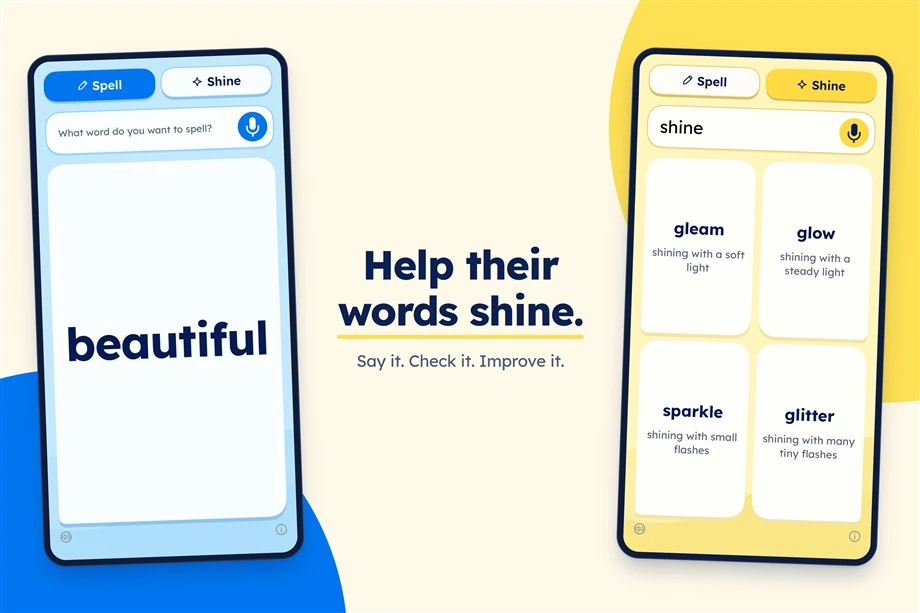
Spell & Shine gives children support at the moment they need a word. Spell helps them check a spelling; Shine helps them explore vocabulary and choose a word that fits their meaning.
Who is it for?
For primary children writing stories, sentences or homework, with support from a parent or teacher when needed.
Getting started
How to use Spell & Shine
Start in Spell
Say the word you want to spell and check the word shown on screen. Encourage your child to look carefully at its spelling before using it.
Explore in Shine
Use Shine to explore words connected with an idea. Read the suggestions together and discuss how their meanings differ.
Bring it back to the sentence
Choose a word that matches the intended meaning. Read the whole sentence aloud to check that the word sounds right in context.
Home & classroom
A few ways to use it
- At home: keep the app beside a piece of writing so your child can check a word and continue their sentence.
- In class: compare vocabulary suggestions and discuss why one word suits a sentence better than another.
- When editing: revisit one repeated word and choose an alternative that still says what the child means.
Useful to know
Common questions
Can children use it while writing?
Yes. It is designed to support spelling and vocabulary as children compose and edit their own writing.
Does every suggested word mean exactly the same thing?
No. Similar words can have different shades of meaning. Read the suggestion and try it in the sentence before choosing it.
Is there an App Store version?
Spell & Shine is available in a browser and on the App Store. The guide links to both versions.
Ready to try it?
Open Spell & Shine and explore it for yourself.